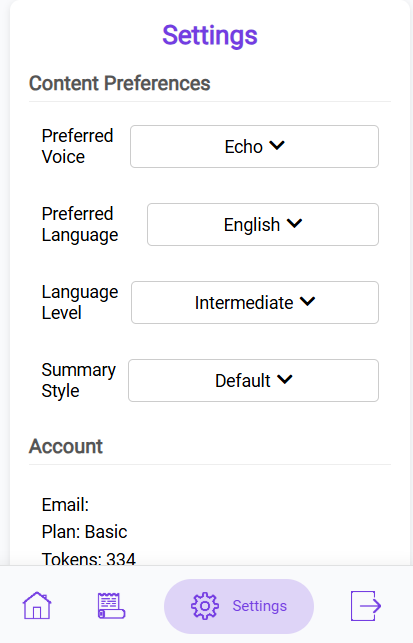
My Account

Subscription Management

Free Plan

Active

Renewal Date: -

Briefs/Month: -

Your Audio Articles

Loading your audios...

AudioBrief Logo

Turn Any Article into an
Audio Summary with AI.

Stop reading, start listening.
Consume content 3x faster.

AudioBrief instantly transforms long web articles into concise, human-like audio summaries. Perfect for commuters, multitaskers, and anyone looking to boost productivity.

AudioBrief App Interface showing an audio player and article summary

Information Overload is Real.
AudioBrief is the Cure.

In today's fast-paced world, keeping up with the news, industry trends, and long-form content is a constant struggle. You have a dozen tabs open that you "mean to read later," but later never comes.

AudioBrief solves this problem. We use advanced AI to extract the core value from any web article and convert it into a digestible audio summary. Whether you're commuting, working out, or cooking dinner, you can now consume high-value content without being glued to a screen. It's not just text-to-speech; it's a productivity superpower.

1

Click

Open any article.

2

Summarize

Get the key points instantly.

3

Listen

Play audio in your preferred voice.

Experience AudioBrief

Listen to examples of articles converted into audio with different styles and voices.

US Flag English Voice: Echo

Kyiv can win all of Ukraine back from Russia, Trump says

French Flag French Voice: Echo

Ligue des champions : objectif remontada pour le Real Madrid et Mbappé face à Arsenal

German Flag German Voice: Echo

China leapfrogs US in global market for open AI models

Who is AudioBrief For?

Designed for anyone who wants to learn more in less time.

💼

Busy Professionals

Stay ahead of industry trends and market news while multitasking. Turn your commute into a briefing session.

🎓

Students & Researchers

Quickly grasp the key concepts of long academic papers and articles without spending hours reading.

🏃

Active Learners

Consume content while running, at the gym, or doing chores. Make your downtime productive.

👀

Visual Fatigue Savers

Give your eyes a break from screens. Listen to your articles instead of straining your vision.

🗣️

Language Learners

Listen to summaries in different languages to practice comprehension and pronunciation.

🚀

Productivity Hackers

Consume 3x more content by listening to concise summaries instead of reading full text.

11 Summary Styles.
Your Content, Your Way.

Don't just listen to a robot read a webpage. AudioBrief uses advanced AI to analyze the text, understand context, and generate a summary in exactly the style you want — from concise briefings to satirical takes.

  • 11 Styles: Default, TL;DR, Bullet Points, Explainer, Optimistic, Key Quotes, Contextual, Action Items, Creative, Atrioc, and Sarcastic.
  • Language Levels: Choose Beginner, Intermediate, Advanced, or Native for any language.
  • Auto Language: Read in English, output in French, Arabic, German — you choose.
AI Article Summarization Interface showing summary options

Premium AI Voices.
Or Go Fully Offline.

Choose from 6 expressive OpenAI neural voices for cloud-quality audio, or use the built-in Piper local voice for instant, completely private, offline playback — no data ever leaves your device.

  • 6 OpenAI Voices: Echo, Alloy, Fable, Nova, Onyx, Shimmer — human-like quality.
  • Piper Local TTS: Free, private, runs entirely in your browser.
  • Streaming Audio: Playback starts immediately — no waiting for the full file.
Natural Text-to-Speech Voice Selection Interface

Global Knowledge.
10+ Languages Supported.

Found an interesting article in a language you don't speak fluently? AudioBrief can translate and summarize it for you instantly.

  • Instant Translation: Read French news in English, or vice versa.
  • Language Learning: Listen to summaries in your target language.
  • Global Reach: Access content from around the world.
Multi-language Support and Translation Interface

Right-Click to Brief.
Queue Articles for Later.

No copy-pasting, no uploads. AudioBrief is woven into your browsing. Right-click any article link to queue it, or click the extension icon on any open page and hit "Brief it!"

  • Context Menu: Right-click any link to add it directly to your queue.
  • Audio Queue: Line up multiple articles and listen back-to-back.
  • Dashboard History: Every brief is saved — listen again anytime from any device.
Chrome Extension Usage on a web article

Simple, Transparent Pricing

One brief = one AI-generated audio summary. Pick how many you need.

Free

$0/month

Perfect for trying it out

  • ✓ 5 briefs per month
  • ✓ Standard AI voice
  • ✓ Default summary style
  • ✓ Article history

Basic

$4.99/month

For regular readers

  • ✓ 30 briefs per month
  • ✓ 6 premium AI voices
  • ✓ All 11 summary styles
  • ✓ 10+ languages & auto-translation
  • ✓ Language level settings
  • ✓ Full article history

No contracts. Cancel anytime. Unused briefs roll over.

Frequently Asked Questions

Everything you need to know about turning text into audio.

AudioBrief is a Chrome extension that uses advanced AI to read web pages, extract the main content, and generate a concise summary. It then converts this summary into high-quality audio using neural voices — allowing you to listen to articles instead of reading them.

Yes — we offer a Free Plan with 5 briefs per month, no credit card required. Each brief costs exactly 1 token regardless of article length. If you want a fully free option, AudioBrief also includes Piper local TTS, which can read articles aloud offline in your browser without using paid OpenAI tokens. For regular listeners, Basic gives you 30 briefs/month for $4.99, and Pro gives you 80 briefs/month for $9.99.

AudioBrief offers 11 distinct styles: Default (clear narrative), TL;DR (ultra-short), Bullet Points (scannable list), Explainer (teaches you the topic), Optimistic (silver-lining framing), Key Quotes (verbatim highlights), Contextual (background & implications), Action Items (what to do next), Creative (storytelling tone), Atrioc (energetic streamer style), and Sarcastic (dry wit commentary). Basic and Pro plans unlock all styles; Free users get Default and Atrioc.

Piper is a free, open-source text-to-speech engine that runs entirely inside your browser using WebAssembly — no audio is sent to any server. It's perfect for privacy-conscious users or when you want unlimited playback without using tokens. You can select it in the extension preferences under TTS Provider.

When your token balance hits zero, AudioBrief automatically switches to Piper local TTS and reads the full article text aloud (no AI summary). You can still listen — you just won't get the AI-condensed version until you top up your tokens by upgrading or renewing your plan.

Right-click any article link on any webpage and you'll see "Add to AudioBrief Queue" in the context menu. AudioBrief will open that URL in the background, extract the content, and queue it for summarization — so you can line up multiple reads without leaving the page you're on.

The audio queue lets you line up multiple articles to listen to back-to-back. Each queued article is automatically extracted and briefed. You can view and manage the queue directly in the extension popup. It's ideal for batch-processing your reading list in one session.

Language Level controls the vocabulary and sentence complexity of the AI summary. Choose from Beginner (simple words, short sentences), Intermediate, Advanced, or Native (full complexity, idiomatic language). This is especially useful for language learners who want to practice comprehension at a controlled difficulty level.

AudioBrief supports 10+ major languages including English, French, German, Spanish, Italian, Portuguese, Arabic, Dutch, Japanese, and more. You can read an article in any language and have it summarized and read back in a completely different language — great for language learners and global news consumers.

Basic and Pro subscribers can choose from 6 OpenAI voices: Echo (default, neutral male), Alloy (neutral), Fable (expressive British), Nova (warm female), Onyx (deep male), and Shimmer (clear female). Free users get the Echo voice. All voices stream directly to your browser so playback starts immediately.

Screen readers read every word on the page — ads, menus, footers — in a robotic voice. AudioBrief intelligently strips away the noise, condenses the actual content using AI, then reads it back in a natural neural voice. You get the key information in a fraction of the time, in a style you choose.

Yes. Every brief generated with the Chrome extension is automatically saved to your dashboard. Log in to audiobrief.cc from any mobile browser (iOS or Android) to find your full audio history and replay any summary.

AudioBrief works on the vast majority of news sites, blogs, and long-form content pages. It may not work on paywalled content (where the full text isn't accessible), PDFs, or pages that block content extraction. For best results, use it on publicly accessible article pages.

Yes — unused briefs roll over to the next billing cycle, so you don't lose them at the end of the month. Your balance can keep building if you use AudioBrief less frequently.

Yes, absolutely. You can cancel from your dashboard at any time with no cancellation fees. Your paid access and remaining tokens continue until the end of the current billing period. After that, your account automatically reverts to the Free plan.

Article summaries and audio are stored securely in Google Firebase (Cloud Firestore and Cloud Storage). We never sell your data. If you use the Piper local TTS mode, audio is generated entirely on your device — nothing is sent to our servers. See our Privacy Policy for full details.

Our AI models (powered by OpenAI) are highly accurate at capturing the core message of an article. They may occasionally miss nuance or context for highly specialized topics. Choosing the Contextual style adds background information and implications that help fill those gaps.

Ready to listen?

Try for Free